


STORE — IMPORT — EXPORT YOUR FAVORITE RENDER SETTINGS
—
PRESETS LIST

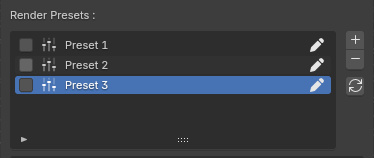
Store all render settings from the RENDER PROPERTIES and OUTPUT PROPERTIES main panels into Render Presets.
Presets can individually be assigned and used by any variant at render time.

NEW
PRESET
Create new render preset with current settings from Render Properties and Output Properties. By default, newly created presets are listed as follow:
Preset 1
Preset 2
Preset 3
…

DELETE
PRESET
Removes the preset from the lister and from all variants previously using it.

UPDATE
PRESET
Refresh selected preset with latest render data from Render Properties and Output Properties if any changes were made to ensure your variants are using the desired settings.

RENAME
PRESET
Rename anytime by clicking on the Rename button next to each preset’s name. If a preset is already assigned to a variant, the new name will be updated in the variant's panel.

SELECT
PRESET
Render Presets can be exported (in JSON files) and be retrieved in other blend files. Select (check) the preset(s) you want to export and hit "EXPORT” (See PRESET ACTIONS for details)
—
PRESET SUMMARY
Each preset stores ALL render properties and their values.
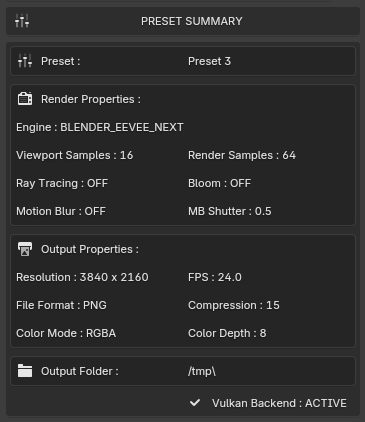
For fast presets overview, a selection of popular render data stored in the selected preset are listed in the Preset Summary tab.
Some properties are Engine-specific and will change depending on if you are using EEVEE, CYCLES or WORKBENCH.

RENDER PROPERTIES
EEVEE
Render Engine : BLENDER_EEVEE_NEXT
Viewport Samples
Render Samples
Raytracing : ON/OFF
Bloom : ON/OFF
Motion Blur : ON/OFF
MB Shutter Speed
CYCLES
Render Engine : CYCLES
Viewport Threshold
Render Threshold
Viewport Samples
Render Samples
Denoising : ON / OFF
Denoiser
WORKBENCH
Render Engine : BLENDER_WORKBENCH
Color Type
Light
Studio Light
Scene Lights : ON / OFF
Scene World : ON / OFF
Render AA
Cavity : ON / OFF
Cavity Type

OUTPUT PROPERTIES
Resolution (X,Y)
Frame Rate (FPS)
File Format
Compression
Color Mode
Color Depth
Output Folder : *Your custom destination path*
—
PRESET ACTIONS

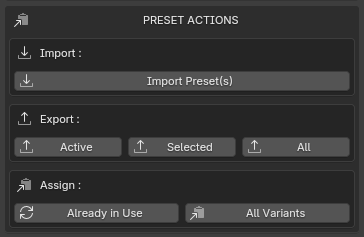
This is where you can manage all your Render Presets.
You can import, export and manually assign presets in one click.

IMPORT
PRESET(S)
Render Presets previously exported with the addon from other blend file scenes can be imported and used like other presets.

EXPORT
PRESET(S)
Render Presets can be exported (in JSON files) and be retrieved in other blend files, in several ways:
Export active preset only
Export selected (checked) preset(s)
Export all presets
ASSIGN
LINKED
Re-Assign Active Preset to all variants using it already. This makes sure the preset is assigned for Batch Render.
ASSIGN
ALL
Assign Active Render Preset to all existing variants. Once assigned, the Render Preset will appear in the Preset lister of each variant and will be used at render.

Back